The Story of Traffic Jam 3D
The journey in Traffic Jam 3D begins with a basic car and a series of trips along busy highways. At first, drivers may struggle to overtake other vehicles, maintain a safe distance, and complete objectives within the time limit. One poorly timed lane change can bring the entire journey to an early end.
With each challenge, experience and rewards gradually add up. Players can use their earnings to upgrade their cars, improve performance, and prepare for more difficult missions. As traffic becomes heavier, speed is no longer the only factor that matters. Awareness, choosing the right moment to overtake, and reacting to unexpected situations also become essential skills.
The farther players progress, the more they realize that a successful journey requires a balance between speed and control. Early mistakes become valuable lessons, helping them handle each new drive more effectively.
Traffic Jam 3D does not tell its story through characters or lengthy dialogue. Instead, players create their own journeys through missions, car upgrades, and challenges on the road. Every completed stretch of highway marks progress in their driving skills and introduces new goals to pursue.
Figure 1. Take the driver's seat in Traffic Jam 3D
What Makes Traffic Jam 3D So Engaging?
Traffic Jam 3D builds challenges around simple controls. Accelerating, braking, and changing lanes are easy to perform, but the effectiveness of each action depends on timing. When two cars are moving close together, players must decide whether there is enough space to overtake or whether slowing down and waiting for another opportunity is the better choice. Making these decisions continuously keeps players focused throughout each drive.
The game also combines driving skills with a progression system. Completing missions and earning rewards allows players to unlock vehicles or upgrade important performance stats. As a result, every drive becomes both a reflex challenge and an opportunity to work toward long-term vehicle improvements.
Four game modes expand the experience in different ways. Career Mode focuses on missions, Infinite Mode tests how long players can stay on the road, Time Against adds time pressure, and Free Mode allows players to practice without focusing on level-based objectives. Players can choose the experience that best suits their skills and goals.
About Traffic Jam 3D
Core Gameplay
Traffic Jam 3D is a browser-based 3D driving game where players control vehicles on roads with changing traffic conditions. The goal is not simply to maintain speed but also to avoid collisions, choose the right lanes, and meet the requirements of each game mode.
The gameplay revolves around three main elements. The first is speed control. Driving fast can save time or increase scores in certain situations, but it also reduces reaction time when obstacles appear. The second is distance management. Watching the positions of vehicles ahead and on either side helps players identify safer opportunities to change lanes. The third is objective completion. Each mode requires a different approach, so driving as fast as possible is not always the best strategy.
Rewards and upgrades provide additional motivation after each run. Players can spend their earnings to improve their cars and prepare for missions that demand greater speed or better handling.
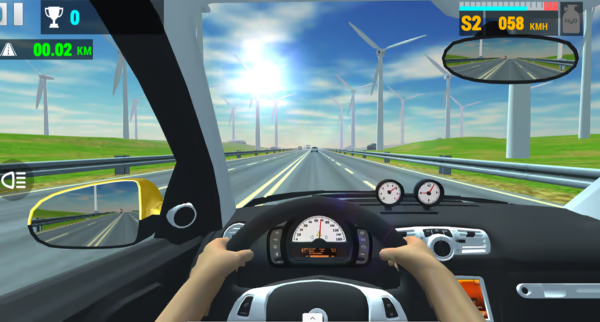
Figure 2. Ultra-realistic driving
Controls
On a computer, Traffic Jam 3D uses straightforward keyboard controls:
- Up Arrow: Accelerate
- Left/Right Arrow: Steer left or right
- Down Arrow: Brake
- C: Change camera view
- N: Use Nitro
To get started, visit https://motox3m.io/ in a browser on your computer or phone. Select Play, wait for the game to load, then choose a game mode and begin your journey. While driving, watch the traffic ahead, adjust your speed, and avoid changing lanes when there is not enough room.
Tips for Beginners
- Master braking before speeding up: When starting out, practice slowing down and keeping your car under control. This gives you more time to react when traffic suddenly becomes heavier.
- Check available space before overtaking: Do not change lanes just because a small gap appears. Check the positions of nearby vehicles and consider where they might move next.
- Use Nitro strategically: Accelerating on an open stretch of road helps you make better use of the speed boost, while activating Nitro in heavy traffic can make the car harder to control.
- Upgrade based on your weaknesses: If you frequently crash while changing lanes, consider improving handling before focusing entirely on the engine. If a mission requires you to finish quickly, speed may become a higher priority.
The Visual and Audio Design of Traffic Jam 3D
Graphics
Traffic Jam 3D's visual design focuses on a three-dimensional road environment and clear situational awareness at high speeds. The road surface, lane markings, vehicles ahead, and surrounding scenery create a sense of depth.
The road typically features neutral gray tones, while lane markings and traffic details provide clear visual references. Vehicles come in different colors, helping players identify nearby traffic without having to distinguish cars against a scene filled with excessive decorative details.
Highway features the familiar look of an expressway, Desert uses warm colors to evoke a dry landscape, and City brings buildings and urban scenery into view. These environmental differences refresh the visual experience without completely changing the driving mechanics.
The rear camera view helps players track their car's position and distance from other vehicles, while the cockpit view creates a stronger sense of immersion. Switching camera angles lets players choose between a more direct driving perspective and a broader view of the surrounding road.
Sound
Sound helps communicate how the vehicle is performing and reinforces the sensation of speed. Engine sounds, acceleration effects, and Nitro-related audio add context to the action on screen. Combined with moving scenery and surrounding traffic, these effects make each drive feel continuous rather than like a simple sequence of control inputs.
Audio also helps establish the pace of the gameplay. As speed increases, the visuals and driving effects work together to emphasize the sensation of moving faster. However, players still need to rely primarily on visual observation to identify gaps and avoid collisions, since sound cannot replace watching the traffic ahead.
Four Main Game Modes in Traffic Jam 3D
Career Mode: Build Your Driving Career
Career Mode focuses on a level-based mission system. Each stage introduces a specific objective, such as reaching a required score or arriving at a checkpoint within a time limit. Players must adjust their driving strategies to meet the mission requirements instead of focusing only on maximum speed.
This mode suits players who prefer a clear progression system. Completing stages provides opportunities to earn rewards and prepare their vehicles for upcoming challenges. As the difficulty increases, choosing the right moment to overtake and maintaining control over speed become even more important.
Infinite Mode: Drive Without End
Infinite Mode challenges players to stay on the road for as long as possible. Rather than following a sequence of level-based missions, players must continuously adapt to traffic and avoid collisions that could end their run.
The main challenge lies in maintaining concentration. One poorly timed overtaking maneuver can bring the journey to an end, so players need to assess risks instead of constantly looking for ways to accelerate.
Time Against: Beat the Clock
Time Against adds pressure through a time limit. Players must balance speed and precision to complete their objectives before the clock runs out. Driving too slowly may prevent them from meeting the target, while accelerating without control increases the risk of collisions.
An effective strategy is to identify open spaces early and avoid unnecessary lane changes. Instead of accelerating constantly, maintain a steady pace and take advantage of overtaking opportunities when conditions allow.
Free Mode: Drive Freely
Free Mode is ideal for players who want to get familiar with the controls or experiment with different driving techniques without focusing on level-based missions. It provides an environment for practicing braking, changing lanes, and switching camera angles before moving on to more demanding modes.
This mode also allows players to enjoy driving at their own pace. However, reward conditions and available features may vary depending on the game version.
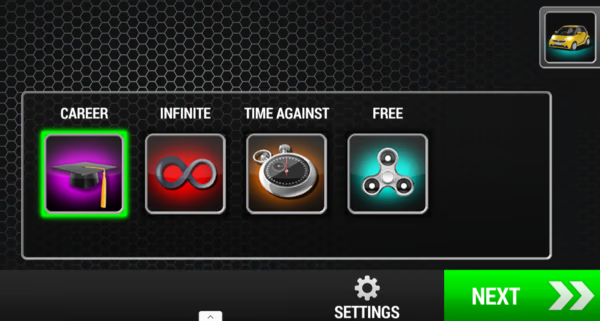
Figure 3. Four Main Game Modes
Maps and Road Customization
Traffic Jam 3D offers environments such as Highway, Desert, and City, each giving the journey a distinct look. Highway features open expressways, Desert stands out with its hot, dry scenery, and City changes the surroundings with buildings and urban landscapes.
In addition to map selection, the game allows players to adjust the time of day and choose between one-way and two-way traffic. These options affect how players observe the road and evaluate overtaking opportunities. Two-way traffic, in particular, requires greater caution when choosing a lane because overtaking maneuvers must be carefully planned to avoid head on collisions.
Traffic Jam 3D Cars and Upgrade System
The Garage is the main hub for managing vehicles and upgrading their performance. Players can use their rewards to unlock new cars or improve driving stats. This system connects driving results with access to better vehicle options.
Available upgrades typically include the engine, handling, and brakes. Engine upgrades focus on speed, handling improvements support steering and directional control, and brake upgrades help players slow down when situations demand it. Some versions also offer paint colors and wheel customization, allowing players to personalize their vehicles.
When choosing upgrades, consider the actual requirements of each mission. Higher speed can be useful in time limited challenges, but it will not automatically help you complete a stage if your handling skills are not up to the task. A car that balances speed and control may be more useful when navigating heavy traffic.
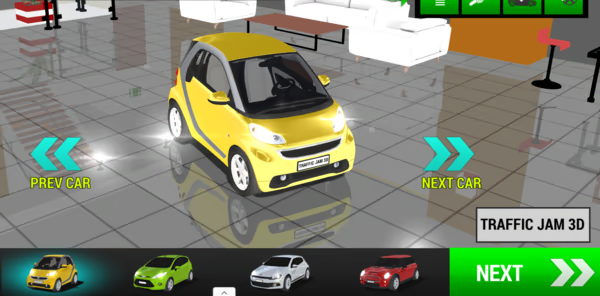
Figure 4. Diverse range of vehicles
Frequently Asked Questions About Traffic Jam 3D
Does Traffic Jam 3D Require a Powerful Computer?
As a browser-based 3D game, performance depends on your device, browser, and how the game version is implemented. If the game loads slowly or movement feels choppy, close unnecessary tabs, update your browser, and check your internet connection.
Why Can't I Complete a Mission Even When Driving Very Fast?
Speed is only one part of the gameplay. Some missions also require you to reach a certain score, arrive at checkpoints, or complete specific objectives. Check the stage's win conditions and prioritize those goals instead of focusing exclusively on speed.
Can I Change the Camera View While Driving?
Yes. In versions that support the camera shortcut, you can press C to switch views. Try different camera angles to find the perspective that works best for you, especially when judging distances from nearby vehicles.
What Happens When Your Car Crashes?
A collision can interrupt your journey or end your run, depending on the game mode and version. If crashes happen frequently, reduce your speed in heavy traffic, check your surroundings before changing lanes, and avoid overtaking when there is not enough safe space.