Conquer Every Road in Drive Quest's Open World
Drive Quest takes 3D driving beyond fixed racetracks, opening up a massive world where players can explore freely and test their driving skills. From busy city streets and highways to bridges, tunnels, and port areas, every road offers a different driving environment.
In Drive Quest, players have full control over their journey. Instead of following a predetermined route, they can choose where to go, speed down straight roads, discover new areas, or switch to driving challenges whenever they want a change of pace.
Drifting is one of the highlights of the experience. By using the handbrake and adjusting the car's direction through corners, players can pull off slides and rack up points. Roads with ramps also create opportunities to perform daring stunts.
Figure 1. Drive Quest online and take the wheel in a 3D open world
6 Exciting Game Modes to Explore in Drive Quest
Drive Quest features six game modes, each with its own objective, ranging from relaxed map exploration to challenges that require precise vehicle control.
Free Roam Mode
Free Roam is perfect for players who want to drive freely without being restricted by specific missions. Explore different roads, cruise through the city, speed along highways, or discover hidden spots across the map. It's also a great way to get familiar with the car's handling before taking on tougher challenges.
Drift Mode
Drift Mode focuses on sliding techniques and vehicle control through corners. Players use the handbrake to initiate drifts, maintain the right direction, and keep the slide going to earn points. Rather than simply flooring the gas to reach high speeds, this mode requires a combination of steering, speed control, and well-timed handbrake use.
Checkpoint Mode
Checkpoint Mode challenges players to drive through designated checkpoints within a time limit. Accelerating at the right moments, choosing an efficient route, and avoiding loss of control will help players complete each objective more effectively.
Stunt Mode
Stunt Mode brings car-based stunt challenges to the game, featuring ramps and jumps. Players need to build up the right speed before reaching a ramp, keep the car stable in the air, and prepare for landing. Uncontrolled acceleration can send the car off course, so proper positioning before each stunt is essential.
Radar Mode
Radar Mode focuses on reaching target speeds at designated speed-check zones. Players need to choose a suitable stretch of road, accelerate before passing the checkpoint, and maintain control while driving at high speeds.
Object Destruction Mode
Object Destruction Mode shifts the focus to smashing designated objects during challenges. Players drive toward their targets and use the vehicle's momentum to complete the objectives. Unlike drift or checkpoint challenges, this mode offers a straightforward goal that emphasizes navigation and handling.
Is Driving in Drive Quest Difficult?
Drive Quest uses familiar keyboard controls, making it easy for players to get comfortable with driving on a computer.
- WASD / Arrow keys: Steer, accelerate, and brake
- Spacebar: Use handbrake
- C: Change camera view
- R: Reset vehicle
- H: Use horn
- L: Toggle headlights
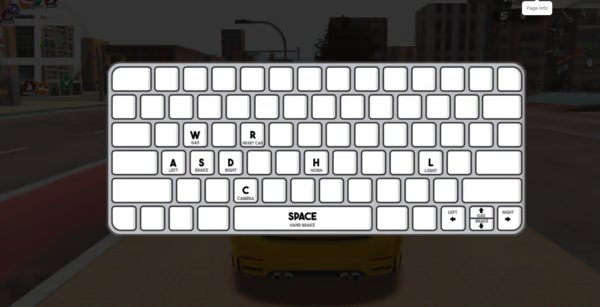
Figure 2. Control panel system
A Collection of 35 Cars and Customization Options to Match Your Style
A Diverse Car Collection
Drive Quest features 35 cars that players can unlock and choose from. The collection encourages players to explore, complete challenges, and earn rewards as they progress. Instead of sticking with a single vehicle throughout the game, players can expand their collection and keep their driving experience fresh.
Customize Your Car's Appearance
The customization system lets players modify various exterior details, giving each vehicle its own style.
- Body Paint: Choose colors that match your personal taste.
- Rims and Tires: Change the look of your wheels.
- Tint: Adjust the darkness of your windows.
- Wraps: Add decorative designs to your car's body.
- Air Suspension: Adjust the air suspension system.
- Camber: Change the angle of the wheels for a distinctive look.
These options offer plenty of room for personalization, from clean, simple looks to bold, modified styles. Earning in-game currency through driving and completing challenges also gives players more opportunities to unlock vehicles for their collection.
Explore a 3D Map Filled with Diverse Driving Environments
Drive Quest's 3D world features a variety of roads and locations, each with its own characteristics. Highways are ideal for picking up speed, city streets offer areas to explore, and bridges and tunnels add variety to every journey. Port areas and side roads provide more options beyond the main routes.
The camera view can be changed while driving, including a chase camera, a hood view, and a cinematic view. Players can choose the perspective that works best for high-speed driving, drifting through corners, or pulling off jumps.
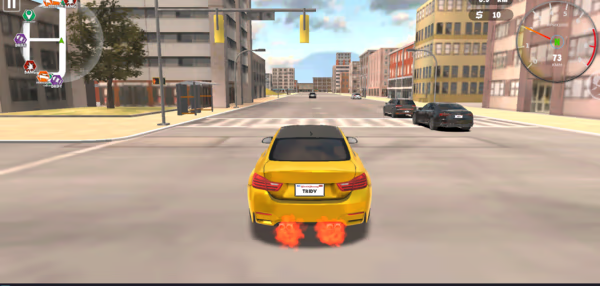
Figure 3. Love drifting and high-speed action
Play Drive Quest Online Free on Motox3m.io
Drive Quest combines open-world exploration, drifting, speed challenges, and vehicle customization. Its six game modes let players switch between free driving and objective based challenges, while the collection of 35 cars and various customization options provide more reasons to keep playing.
Visit Motox3m.io to explore its online driving game collection and look for Drive Quest if the game is available on the website. The browser version of Drive Quest lets players jump straight into the action without a separate installation, making it easy to start conquering 3D roads.